
In private testing on iPhone

Make room for your life.

Tephy fits your tasks around your classes and work.
Get early access A time-aware planner. Say it TEH-fee.
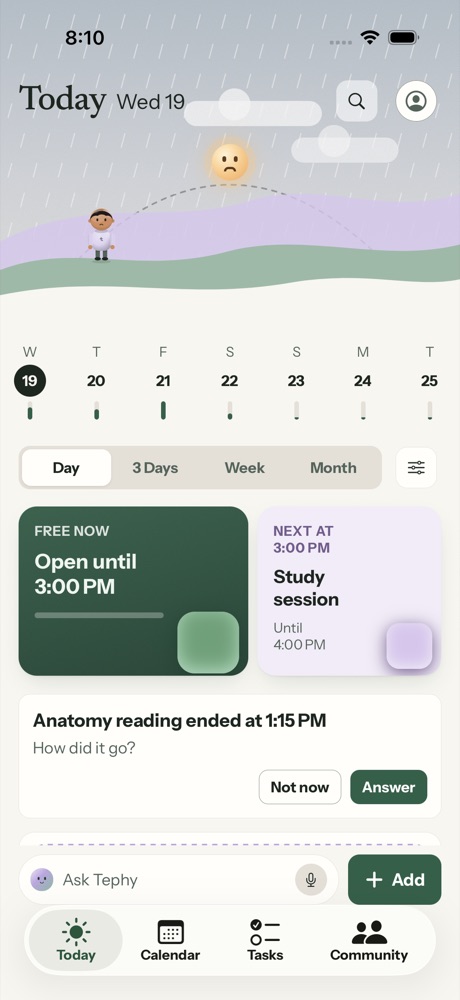
Tephy on iPhone, the Today screen. A soft lavender and green sky with a small character, a week strip, a card that says you are free until 3:00 PM, and the next thing, a study session.

A sky that keeps time

The top of Today follows the hour and the weather, from sunrise to the moon.

Free now, and what’s next

See how long you have before the next thing starts, without opening the calendar.

A quick check after each block

When something ends, Tephy asks how it went and plans the next one with that in mind.

Calendar

Your week, painted on the sky.

Every day sits on a sky that moves from morning light to night, so you can feel where the hours go.
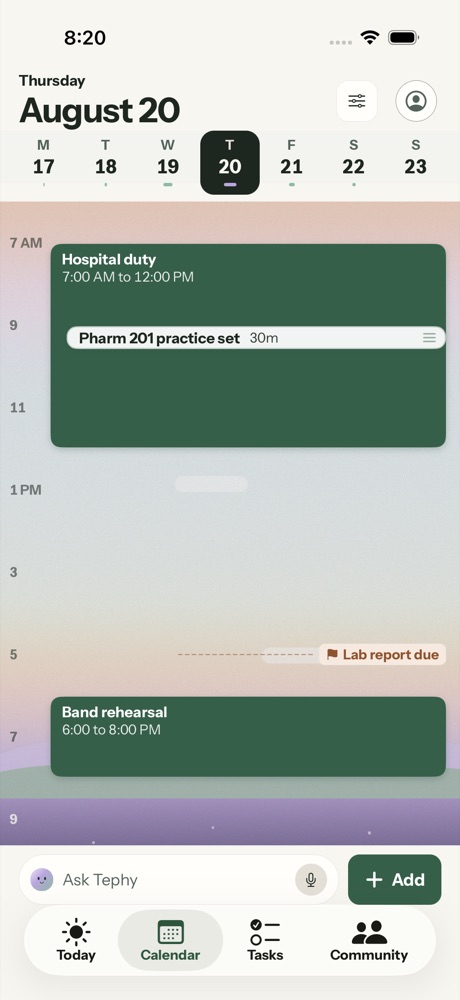
  • Day, 3 Days, Week and Month, one tap apart.
  • Drag a block to change its time. Repeats ask if you mean this one or all of them.
  • Due dates show as small flags, so a deadline never hides inside a busy day.
Tephy Calendar, day view for Thursday. Hospital duty in the morning with a practice set inside it, a flag for a lab report due at 5, and band rehearsal in the evening, over a sky that fades from peach to lavender.
Tasks

Tasks that don’t need a time yet.

Not everything belongs on the calendar right away. Keep it in a drawer until you’re ready.
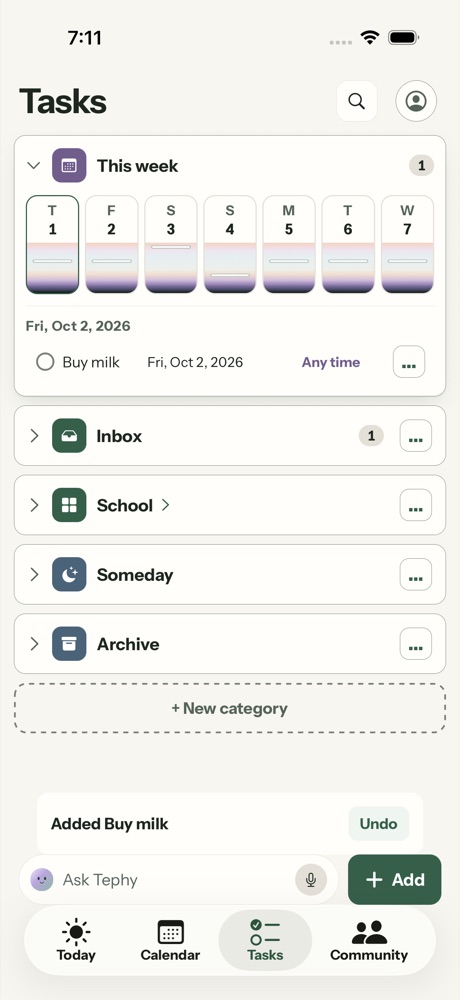
  • Drawers for Inbox, School, Someday and any category you add.
  • This week shows what’s coming, day by day.
  • When you’re ready, plan a task into a free hour. Undo stays right where you are.
Tephy Tasks. A This week strip with seven days, a task to buy milk, drawers for Inbox, School, Someday and Archive, and a note that says Added Buy milk with an Undo button.
Ask Tephy

Say it your way. You make the call.

Type a plan the way you’d text a friend, in any language. Tephy drafts the change, and you decide what goes in.
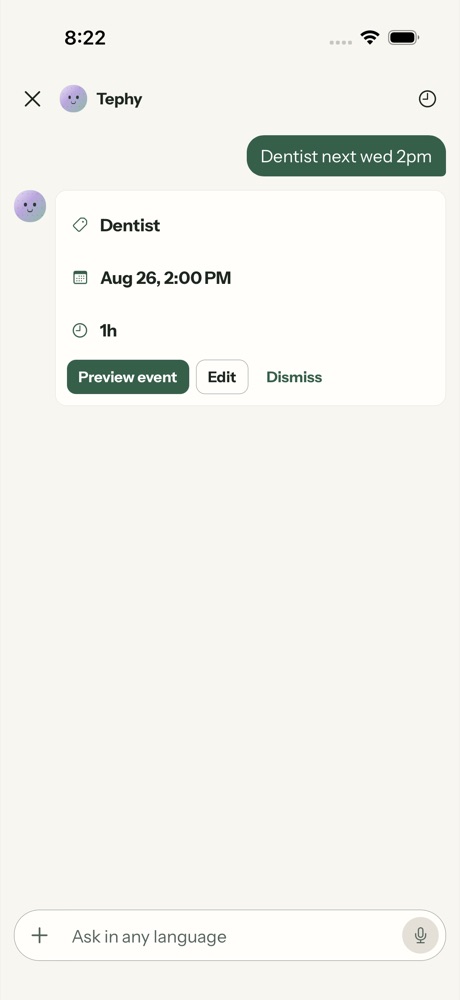
  1. Type it“Dentist next Wed 2pm.” Tephy fills in the day, the time and how long.
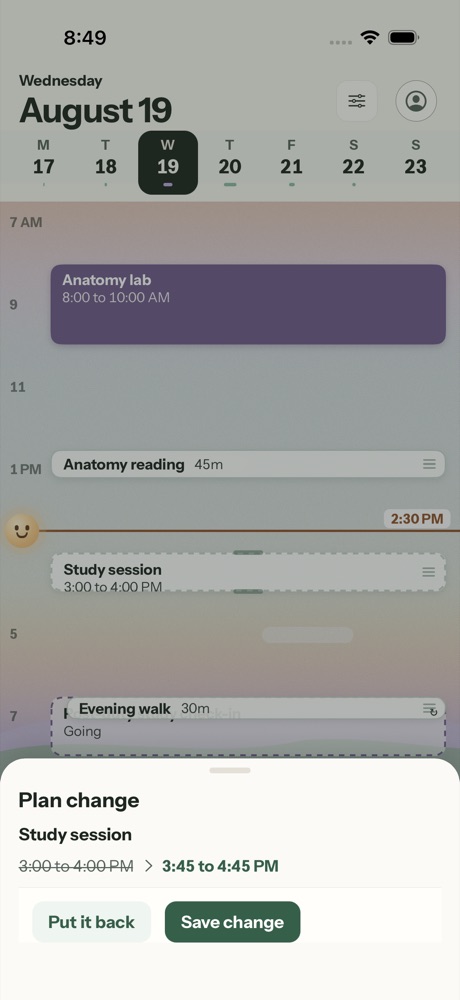
  2. Check itEvery change shows the old time and the new one, side by side.
  3. Save it, or put it backUndo stays on screen after every change.
Tephy chat. The message Dentist next wed 2pm, and Tephy’s draft below it with Dentist, August 26 at 2:00 PM, one hour, and buttons for Preview event, Edit and Dismiss.
A plan change on the Tephy calendar. Study session moves from 3:00 to 4:00 PM to 3:45 to 4:45 PM, with buttons for Put it back and Save change.
Connections

Bring the calendars you already have.

Tephy works on its own. When you want, connect the places your week already lives.

Apple Calendar

Your events show on Tephy’s Calendar with their titles.

Google Calendar

Connect your school or personal account to see your events in Tephy.

School calendars

Paste a calendar link from Canvas, Moodle or Outlook. Classes and due dates appear on Calendar.

Notion, Todoist, Trello

Dated items arrive as plan changes you can check and add.

Also in Tephy

Areas

A page for each part of your life, like School or Band, with its own colour and its own share of your week.

Community

Plans with friends and groups, and quick polls to find a time that suits everyone.

Who it’s for

Made for full weeks.

Tephy starts by asking what fills your week, then builds a plan you can change.

Students

Classes, readings and deadlines in one place, with due dates you can see coming.

Working students

Shifts and classes share one week, and Tephy finds the open hours between them.

Workers

Meetings, errands and the rest of life, planned around the hours you’re already busy.

Shift work, office hours, freelance, caregiving, sports and creative work all have a place in setup too.

Early access

Want to try Tephy early?

Tephy is in private testing on iPhone. Write to us and tell us what fills your week.

Get early access Or email justin.sy@tephy.app